At home · · Brenda Demasi
Little Coders: why teaching coding without a screen is so good for kids
You can teach a 5-year-old to code without turning on a single screen. All it takes is a pencil, paper and a grown-up willing to play robot. That's the idea behind the Little Coders kit: six printable missions, a certificate and an answer key for parents. It's free, available in Portuguese, English and Spanish, and made for kids aged 5 to 10. In this post, we walk through each sheet and, most importantly, explain why it's worth doing.
What is unplugged coding?
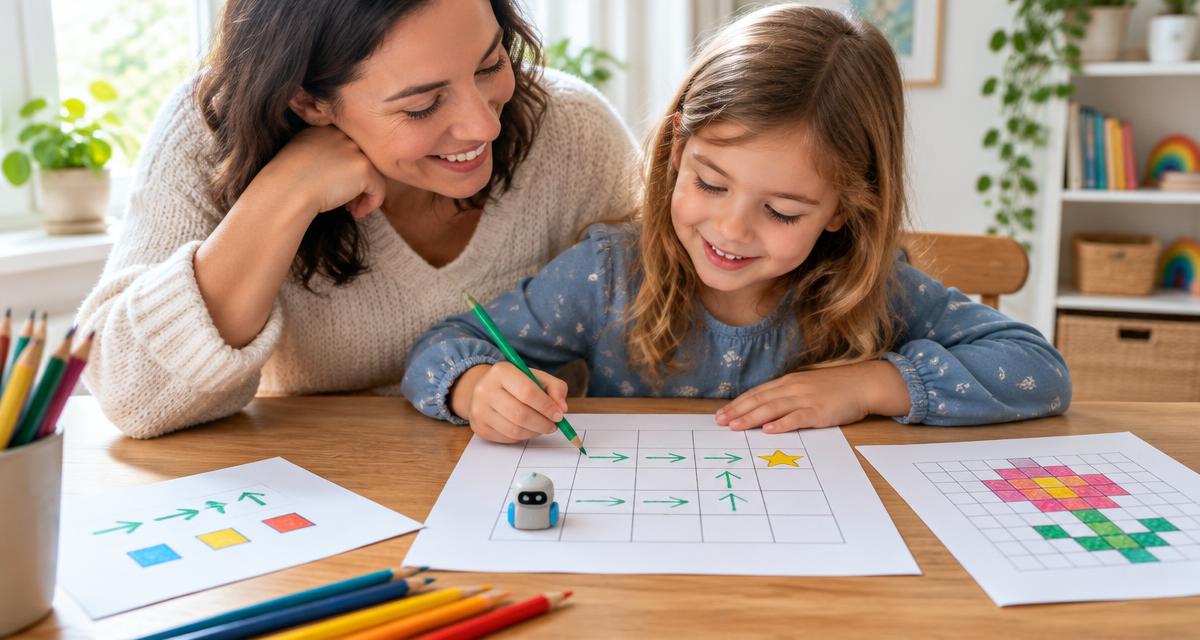
Unplugged coding means teaching computer science ideas without a computer. Instead of typing code, children put steps in order, follow arrows, color in squares and hunt for mistakes on paper. The logic is simple: before you can write a program, you need to think like one. That way of thinking has a name, computational thinking: breaking a problem into parts, spotting patterns and giving clear instructions in the right order. Schools around the world use this approach because it works with young children, who may not read well yet or are too young to spend time in front of a screen.
The six missions
Each sheet introduces a real programming concept, disguised as a game.
| Mission | What the child does | What they learn |
|---|---|---|
| 1. Algorithms | Puts the steps of brushing teeth in order and writes their own sandwich recipe | A program is a sequence of steps, and order changes the result |
| 2. Guide the robot | Writes arrows to get the robot to the star, avoiding the trees | Commands must be exact; plan before you act |
| 3. Pixels | Reads a color code row by row and uncovers a hidden picture | Pictures on a computer are numbers and codes |
| 4. Loops | Turns “→ → → →” into “REPEAT 4 times: →” and continues patterns | Loops make code shorter; patterns help predict what comes next |
| 5. If... then | Matches situations to decisions and colors shapes by a rule | Conditionals: how computers make decisions |
| 6. Bug hunt | Follows a program with a finger and finds the wrong arrow | Debugging: finding and fixing mistakes calmly |
At the end, the child earns a Little Coder certificate to color in, with a medal for each mission. Grown-ups get an answer key page with solutions and ideas for what to try next.
Why it's good for kids
The goal isn't to turn 6-year-olds into programmers. It's to build skills that help at school and in life, whether or not the child ever codes.
It teaches step-by-step thinking. When a child realizes they forgot to “open the toothpaste” before “putting toothpaste on the brush,” they learn to break a big task into small, ordered parts. That helps with everything: packing a school bag, solving a math problem, telling a story with a beginning, middle and end.
It turns mistakes into part of the game. In the bug mission, getting it wrong isn't failing: it's the next clue. Programmers spend much of their time finding and fixing errors. Learning early that a mistake can be fixed builds persistence and takes away the fear of trying.
It reinforces math and reading without feeling like homework. Counting squares, reading color codes, recognizing shape patterns and following written instructions all work on spatial sense, counting, sequencing and reading comprehension.
It trains precise communication. When a grown-up follows the sandwich algorithm word for word and it turns out silly, the child sees right away that vague instructions don't work. It's a fun lesson in expressing yourself clearly.
It's quality time, away from screens. The activities need an adult nearby, reading along, playing robot, celebrating each medal. It's a way to introduce technology that doesn't depend on more screen time.
It prepares them for the next step. Algorithms, commands, loops and conditionals are exactly the building blocks used in tools like ScratchJr and Scratch. A child who has done the kit will recognize the ideas. English
How to use it at home
- Ages 5 to 6: read the instructions aloud and do them together. Start with missions 2 (robot) and 3 (pixels), which are the most visual. In mission 1, the child can draw the steps instead of writing them.
- Ages 7 to 8: let the child read alone and try first. Help only when asked, with questions like “what does the robot do now?”
- Ages 9 to 10: suggest the extra challenge on each sheet and ask them to design their own levels: a new board for the robot, a pixel picture, a buggy program for you to fix.
A few tips work at every age. Do one mission a day, no rush. Take mission 2 to the floor with masking tape and let your child give the commands while you play the robot. And after the activities, look for algorithms and “if... then” in everyday life together: in a cake recipe, at a traffic light, on the microwave.
Download the free kit
The Little Coders kit has 9 A4 pages, designed to print at home, even in black and white. Pick your language: